<?xml version="1.0" encoding="utf-8"?>
<feed xmlns="http://www.w3.org/2005/Atom">
  <author>
    <name>Bruno Salmon</name>
  </author>
  <generator uri="https://hexo.io/">Hexo</generator>
  <icon>https://blog.webfx.dev/favicon.png</icon>
  <id>https://blog.webfx.dev/</id>
  <link href="https://blog.webfx.dev/" rel="alternate"/>
  <link href="https://blog.webfx.dev/atom.xml" rel="self"/>
  <rights>All rights reserved 2026, Bruno Salmon</rights>
  <subtitle>Follow WebFX - a free and open-source JavaFX transpiler project on GitHub.</subtitle>
  <title>The WebFX blog</title>
  <updated>2026-03-09T16:03:00.369Z</updated>
  <entry>
    <author>
      <name>Bruno Salmon</name>
    </author>
    <category term="WebFX" scheme="https://blog.webfx.dev/tags/WebFX/"/>
    <category term="TeaVM" scheme="https://blog.webfx.dev/tags/TeaVM/"/>
    <category term="WebAssembly" scheme="https://blog.webfx.dev/tags/WebAssembly/"/>
    <category term="Kotlin" scheme="https://blog.webfx.dev/tags/Kotlin/"/>
    <category term="JavaFX" scheme="https://blog.webfx.dev/tags/JavaFX/"/>
    <category term="GWT" scheme="https://blog.webfx.dev/tags/GWT/"/>
    <category term="J2CL" scheme="https://blog.webfx.dev/tags/J2CL/"/>
    <content>
      <![CDATA[<p><img src="/2025/11/17/teavm/TeaVM.png" alt="TeaVM"></p><p>TL;DR: We’re excited to announce that WebFX now officially supports TeaVM, a Java to WebAssembly compiler that unlocks faster startup times and broader JVM language compatibility with now Kotlin and Scala!</p><p>We already have <strong>multiple live demos</strong> running with TeaVM, which you’ll <a href="#Try-it-out-WebFX-TeaVM-live-demos-%F0%9F%94%A5">find below</a>.</p><hr><h1 id="What-is-TeaVM"><a href="#What-is-TeaVM" class="headerlink" title="What is TeaVM?"></a>What is TeaVM?</h1><p><a href="https://teavm.org/">TeaVM</a> is a compiler that translates <strong>Java bytecode</strong> into <strong>JavaScript</strong> or <strong>WebAssembly</strong>. This is a key difference from <strong>GWT</strong>, which transpiles <strong>Java source code</strong> directly into JavaScript.</p><hr><h1 id="Why-TeaVM-support-matters"><a href="#Why-TeaVM-support-matters" class="headerlink" title="Why TeaVM support matters"></a>Why TeaVM support matters</h1><ul><li><strong>WebAssembly performance</strong></li></ul><p>Unlike JavaScript, WebAssembly (Wasm) is a low‑level <strong>binary format</strong> already compiled before it reaches the browser, allowing near‑native performance and now supported by all modern browsers.</p><ul><li><strong>Kotlin and Scala support</strong></li></ul><p>Thanks to its bytecode‑based design, TeaVM supports not only Java but also <strong>Kotlin</strong> and <strong>Scala</strong> right out of the box. This expands WebFX beyond Java, allowing teams to choose their preferred language without giving up JavaFX as their cross-platform UI toolkit.</p><ul><li><strong>Future-proofing WebFX</strong></li></ul><p>The language-neutral design of its bytecode (as opposed to Java) is a major reason for WebAssembly’s growing popularity. While JS won’t disappear, it’s likely that more and more web apps will be written in other languages and compiled to Wasm in the future.</p><p>By supporting Wasm today, WebFX is already aligned with this shift and part of the <strong>emerging “post-JavaScript” era</strong>, while still remaining fully compatible with JS.</p><hr><h1 id="Why-we-chose-TeaVM-among-Java-→-Wasm-compilers"><a href="#Why-we-chose-TeaVM-among-Java-→-Wasm-compilers" class="headerlink" title="Why we chose TeaVM among Java → Wasm compilers"></a>Why we chose TeaVM among Java → Wasm compilers</h1><p>While several Java-to-Wasm projects exist, we found that TeaVM was the <strong>most practical and lightweight</strong> solution for Java web development:</p><table><thead><tr><th>Wasm compiler</th><th>Status</th><th>Notes</th></tr></thead><tbody><tr><td><strong>TeaVM</strong></td><td>Active</td><td>Lightweight, mature, supports Wasm GC with DOM API</td></tr><tr><td><strong>GraalVM (Oracle)</strong></td><td>Active</td><td>Heavy output, limited to web workers (no DOM API)</td></tr><tr><td><strong>Kotlin&#x2F;Wasm</strong></td><td>Active</td><td>Kotlin sources only - unusable with JavaFX</td></tr><tr><td><strong>CheerpJ</strong></td><td>Active</td><td>Embeds mini JVM, large binaries</td></tr><tr><td><strong>J2CL&#x2F;Wasm (Google)</strong></td><td>Active</td><td>Internal opaque project (very few com and docs)</td></tr><tr><td><strong>ByteCoder</strong></td><td>Inactive</td><td>Stagnant since 2024</td></tr><tr><td><strong>JWebAssembly</strong></td><td>Inactive</td><td>Stagnant since 2023</td></tr></tbody></table><p>Among these, <strong>GraalVM</strong> is probably TeaVM’s most serious competitor, especially given that it’s backed by Oracle. However, GraalVM has historically focused on the <strong>execution</strong> of Wasm modules in the JVM (GraalWasm), mainly on the server side. Its Java → Wasm compiler and browser support is <strong>only nascent</strong>, <strong>lacks direct DOM access</strong>, and currently produces <strong>much larger binaries</strong>.</p><p>We may add GraalVM support to WebFX if its browser target matures. But for now, <strong>TeaVM</strong> appears to offer the <strong>most advanced, lightweight, and browser-ready Java → WebAssembly solution</strong> available.</p><hr><h1 id="How-we-integrated-TeaVM-into-WebFX"><a href="#How-we-integrated-TeaVM-into-WebFX" class="headerlink" title="How we integrated TeaVM into WebFX"></a>How we integrated TeaVM into WebFX</h1><p>To make TeaVM compatible with the large existing WebFX codebase whose browser interactions are coded with <strong>Elemental2</strong>, the Google library that exposes browser APIs (DOM, events, storage, etc.) to Java, we created a <a href="https://github.com/webfx-project/webfx-platform/tree/main/webfx-platform-teavm-elemental2-polyfill"><strong>polyfill</strong></a> of Elemental2 that allows TeaVM to seamlessly understand and compile the same Elemental2-based code used by GWT.</p><p><img src="/2025/11/17/teavm/Polyfill.svg" alt="Polyfill"></p><p><em>For GWT&#x2F;J2CL developers: this polyfill covers only the subset of the Elemental2 API used by WebFX for now. However, it can be expanded to cover additional Elemental2 APIs as needed. Increasing the coverage is a straightforward (if somewhat repetitive) task, so in principle, it could compile any Elemental2-based project to Wasm with TeaVM.</em></p><p><strong>And it works!</strong> You can now build the same WebFX codebase with either GWT or TeaVM with no changes at all to your application code.</p><hr><h1 id="Try-it-out-WebFX-TeaVM-live-demos-🔥"><a href="#Try-it-out-WebFX-TeaVM-live-demos-🔥" class="headerlink" title="Try it out: WebFX + TeaVM live demos 🔥"></a>Try it out: WebFX + TeaVM live demos 🔥</h1><p>Each demo below is built from the same JavaFX codebase compiled with GWT (JavaScript) and TeaVM (JavaScript and WebAssembly), so you can compare them side by side. Their source code is available in our <a href="https://github.com/webfx-demos"><strong>demos space</strong></a>.</p><table><thead><tr><th>WebFX Demo</th><th align="center">GWT (JS only)</th><th align="center">TeaVM - JS</th><th align="center">TeaVM - Wasm 🤩</th></tr></thead><tbody><tr><td>Enzo Clocks</td><td align="center"><a href="https://enzoclocks.webfx.dev/">EnzoClocks-GWT</a></td><td align="center"><a href="https://enzoclocks-teavm.webfx.dev/">EnzoClocks-TeaVM</a></td><td align="center"><a href="https://enzoclocks-wasm.webfx.dev/">EnzoClocks-Wasm</a></td></tr><tr><td>Modern Gauge</td><td align="center"><a href="https://moderngauge.webfx.dev/">ModernGauge-GWT</a></td><td align="center"><a href="https://moderngauge-teavm.webfx.dev/">ModernGauge-TeaVM</a></td><td align="center"><a href="https://moderngauge-wasm.webfx.dev/">ModernGauge-Wasm</a></td></tr><tr><td>Cube</td><td align="center"><a href="https://cube.webfx.dev/">Cube-GWT</a></td><td align="center"><a href="https://cube-teavm.webfx.dev/">Cube-TeaVM</a></td><td align="center"><a href="https://cube-wasm.webfx.dev/">Cube-Wasm</a></td></tr><tr><td>Mandelbrot</td><td align="center"><a href="https://mandelbrot.webfx.dev/">Mandelbrot-GWT</a></td><td align="center"><a href="https://mandelbrot-teavm.webfx.dev/">Mandelbrot-TeaVM</a></td><td align="center"><a href="https://mandelbrot-wasm.webfx.dev/">Mandelbrot-Wasm</a></td></tr><tr><td>DemoFX</td><td align="center"><a href="https://demofx.webfx.dev/">DemoFX-GWT</a></td><td align="center"><a href="https://demofx-teavm.webfx.dev/">DemoFX-TeaVM</a></td><td align="center"><a href="https://demofx-wasm.webfx.dev/">DemoFX-Wasm</a></td></tr><tr><td>SpaceFX</td><td align="center"><a href="https://spacefx.webfx.dev/">SpaceFX-GWT</a></td><td align="center"><a href="https://spacefx-teavm.webfx.dev/">SpaceFX-TeaVM</a></td><td align="center"><a href="https://spacefx-wasm.webfx.dev/">SpaceFX-Wasm</a></td></tr><tr><td>JArkanoid</td><td align="center"><a href="https://jarkanoid.webfx.dev/">JArkanoid-GWT</a></td><td align="center"><a href="https://jarkanoid-teavm.webfx.dev/">JArkanoid-TeaVM</a></td><td align="center"><a href="https://jarkanoid-wasm.webfx.dev/">JArkanoid-Wasm</a></td></tr><tr><td>Tetris</td><td align="center"><a href="https://tetris.webfx.dev/">Tetris-GWT</a></td><td align="center"><a href="https://tetris-teavm.webfx.dev/">Tetris-TeaVM</a></td><td align="center"><a href="https://tetris-wasm.webfx.dev/">Tetris-Wasm</a></td></tr><tr><td>FX2048</td><td align="center"><a href="https://fx2048.webfx.dev/">FX2048-GWT</a></td><td align="center"><a href="https://fx2048-teavm.webfx.dev/">FX2048-TeaVM</a></td><td align="center"><a href="https://fx2048-wasm.webfx.dev/">FX2048-Wasm</a></td></tr><tr><td>Food Dice</td><td align="center"><a href="https://fooddice.webfx.dev/">FoodDice-GWT</a></td><td align="center"><a href="https://fooddice-teavm.webfx.dev/">FoodDice-TeaVM</a></td><td align="center"><a href="https://fooddice-wasm.webfx.dev/">FoodDice-Wasm</a></td></tr><tr><td>Pac-Man</td><td align="center"><a href="https://pacman.webfx.dev/">PacMan-GWT</a></td><td align="center"><a href="https://pacman-teavm.webfx.dev/">PacMan-TeaVM</a></td><td align="center"><a href="https://pacman-wasm.webfx.dev/">PacMan-Wasm</a></td></tr><tr><td>MsPac-Man</td><td align="center"><a href="https://mspacman.webfx.dev/">MsPacMan-GWT</a></td><td align="center"><a href="https://mspacman-teavm.webfx.dev/">MsPacMan-TeaVM</a></td><td align="center"><a href="https://mspacman-wasm.webfx.dev/">MsPacMan-Wasm</a></td></tr></tbody></table><p><em>Note: TeaVM compiles to Wasm GC, the new WebAssembly standard designed for garbage-collected languages like Java. This feature is currently supported by modern browsers such as Chrome, Edge, Firefox, and Safari (recent versions only).</em></p><hr><h1 id="What’s-next"><a href="#What’s-next" class="headerlink" title="What’s next?"></a>What’s next?</h1><p>WebFX Wasm is already usable today with modern browsers, and we’re now planning to support <strong>dual TeaVM&#x2F;GWT builds</strong> for a reliable transition. WebFX will select the appropriate version at runtime, giving the best of both worlds: WebAssembly where possible, or full JS backward compatibility where needed. So stay tuned for more updates as we refine our TeaVM integration!</p>]]>
    </content>
    <id>https://blog.webfx.dev/2025/11/17/teavm/</id>
    <link href="https://blog.webfx.dev/2025/11/17/teavm/"/>
    <published>2025-11-17T00:00:00.000Z</published>
    <summary>WebFX is joining the emerging “post-JavaScript” era by supporting WebAssembly, Kotlin, and JavaFX on the Web.</summary>
    <title>WebFX now supports TeaVM: bringing WebAssembly and Kotlin to JavaFX on the Web!</title>
    <updated>2026-03-09T16:03:00.369Z</updated>
  </entry>
  <entry>
    <author>
      <name>Bruno Salmon</name>
    </author>
    <content>
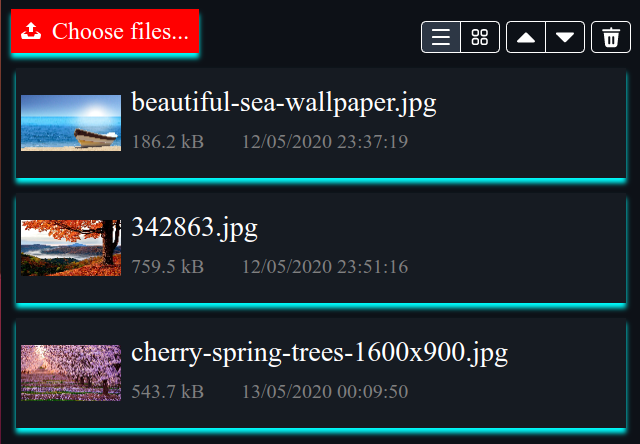
      <![CDATA[<p><a href="https://files.webfx.dev/"><img src="/2022/10/19/accessing-local-files/FilesDemo.png" alt="Files Demo"></a></p><p> First of all, a big thank you to the JavaFX community for warmly welcoming us on Twitter. In just a couple of days, you were 100+ to follow us on our brand-new <a href="https://twitter.com/WebFXProject">@WebFXProject</a> account! And <a href="https://www.jfx-central.com/">JFX-Central</a> kindly listed us in their <em>Links of the Week</em> on September 30, including our previous blog post and demo. Thank you all for your interest in WebFX! ❤️</p><p>Thank you also for your questions. And it appeared that the most frequent question asked so far was about accessing local files. So we investigated this possibility, and we are glad to announce that now WebFX can access local files. We made this brand-new <a href="https://files.webfx.dev/">Files demo</a> to demonstrate this.</p><p>This demo lets you select local files with either the <em>Choose files</em> button or drag &amp; drop. The files are listed with their icon and other simple details, and a thumbnail is displayed for images. A grid view is also available with just the thumbnails. You can open your images in full size, and navigate using left &amp; right keys, left &amp; right mouse clicks, or left &amp; right swipes on touch screens. Same with your audio files, which are played together with the equaliser from our DemoFX library. Video files will be played very soon (only the audio is supported for now). Text files are displayed in a TextArea.</p><h1 id="The-issue-with-the-JavaFX-FileChooser-API"><a href="#The-issue-with-the-JavaFX-FileChooser-API" class="headerlink" title="The issue with the JavaFX FileChooser API"></a>The issue with the JavaFX FileChooser API</h1><p>Our initial investigation was rather bad news: it appeared that it was impossible to emulate the JavaFX FileChooser API in the browser, mainly for the 2 following reasons:</p><ul><li><p>In JavaFX, opening the file chooser is done programmatically through a call to <code>FileChooser.showOpenDialog()</code>, which is a blocking call - something prohibited in JavaScript. In the browser however, it is done through a user interaction with the HTML input element <code>&lt;input type=&quot;file&quot;&gt;</code> which is rendered by default with this (ugly) button: <input type="file">   </p></li><li><p>The Web <a href="https://developer.mozilla.org/en-US/docs/Web/API/File">File</a> object returned by the browser sandbox has very limited information about the actual local file. For example, it doesn’t let you know its location on the local device, and its URL is a kind of random UUID valid only for the time of the session. With such a limited object, it’s impossible to emulate java.io.File, the object returned by the JavaFX FileChooser.</p></li></ul><h1 id="The-alternative-WebFX-cross-platform-API"><a href="#The-alternative-WebFX-cross-platform-API" class="headerlink" title="The alternative WebFX cross-platform API"></a>The alternative WebFX cross-platform API</h1><p>While it looks impossible to emulate the JavaFX FileChooser and the Java File API in the browser, the opposite is possible: it’s quite simple to emulate the Web FilePicker and Web File API in Java&#x2F;JavaFX. This is therefore the WebFX approach.</p><p>In our <a href="https://github.com/webfx-project/webfx-platform">WebFX Platform</a>, you will see these 3 new modules:</p><ul><li><code>webfx-platform-file</code> : our File API (<code>dev.webfx.platform.file.*</code>)</li><li><code>webfx-platform-file-java</code> : Java implementation (using Java File)</li><li><code>webfx-platform-file-gwt</code> : GWT implementation (using Web File)</li></ul><p>And in our <a href="https://github.com/webfx-project/webfx-extras">WebFX Extras</a> library, these 3 new modules:</p><ul><li><code>webfx-extras-filepicker</code>: our FilePicker API (<code>dev.webfx.extras.filepicker.*</code>)</li><li><code>webfx-extras-filepicker-openjfx</code> : OpenJFX implementation (using FileChooser)</li><li><code>webfx-extras-filepicker-gwt</code> : GWT implementation (using Web FilePicker)</li></ul><h1 id="Including-this-new-API-in-your-project"><a href="#Including-this-new-API-in-your-project" class="headerlink" title="Including this new API in your project"></a>Including this new API in your project</h1><p>Assuming you already followed our <a href="https://docs.webfx.dev/#_getting_started">getting started guide</a>, just add this line in the <code>&lt;required-libraries&gt;</code> section of the <code>webfx.xml</code> located at your project’s root directory:</p><figure class="highlight xml"><table><tr><td class="gutter"><pre><span class="line">1</span><br><span class="line">2</span><br><span class="line">3</span><br></pre></td><td class="code"><pre><span class="line"><span class="tag">&lt;<span class="name">required-libraries</span>&gt;</span></span><br><span class="line">    <span class="tag">&lt;<span class="name">webfx-library</span> <span class="attr">artifact</span>=<span class="string">&quot;dev.webfx:webfx-extras:0.1.0-SNAPSHOT&quot;</span>/&gt;</span></span><br><span class="line"><span class="tag">&lt;/<span class="name">required-libraries</span>&gt;</span></span><br></pre></td></tr></table></figure><p>This will make your WebFX CLI aware of the WebFX Extras library (no need to do it for the WebFX platform library, as it’s a transitive dependency). Then, each time it sees packages from WebFX Extras or WebFX Platform libraries in your code, it will automatically add the associated module(s).</p><p>For example, if you add the following import to one of your Java files:</p><figure class="highlight java"><table><tr><td class="gutter"><pre><span class="line">1</span><br></pre></td><td class="code"><pre><span class="line"><span class="keyword">import</span> dev.webfx.extras.filepicker.*;</span><br></pre></td></tr></table></figure><p>or, alternatively, temporarily use a fully qualified class name in your code:</p><figure class="highlight java"><table><tr><td class="gutter"><pre><span class="line">1</span><br><span class="line">2</span><br><span class="line">3</span><br><span class="line">4</span><br><span class="line">5</span><br></pre></td><td class="code"><pre><span class="line"><span class="keyword">public</span> <span class="keyword">class</span> <span class="title class_">AClass</span> &#123;</span><br><span class="line">    ...</span><br><span class="line">    dev.webfx.extras.filepicker.FilePicker filePicker;</span><br><span class="line">    ...</span><br><span class="line">&#125;</span><br></pre></td></tr></table></figure><p>and then invoke the <code>update</code> command in your terminal (beside your <code>webfx.xml</code>):</p><figure class="highlight bash"><table><tr><td class="gutter"><pre><span class="line">1</span><br></pre></td><td class="code"><pre><span class="line">webfx update</span><br></pre></td></tr></table></figure><p>It will recognize you are using the <code>webfx-extras-filepicker</code> module, and update the build chain for you (Maven, GWT, etc…). You are now ready to use the API in your Java IDE! </p><h1 id="Ok-great-now-show-me-the-code"><a href="#Ok-great-now-show-me-the-code" class="headerlink" title="Ok great, now show me the code!"></a>Ok great, now show me the code!</h1><p>You can find the complete source code of the demo on <a href="https://github.com/webfx-demos/webfx-demo-files/blob/main/webfx-demo-files-application/src/main/java/dev/webfx/demo/files/FilesApplication.java">GitHub</a>, but we will concentrate here on the essential parts. To start with, here is how to use the WebFX <strong>FilePicker</strong>:</p><figure class="highlight java"><table><tr><td class="gutter"><pre><span class="line">1</span><br><span class="line">2</span><br><span class="line">3</span><br><span class="line">4</span><br><span class="line">5</span><br><span class="line">6</span><br><span class="line">7</span><br><span class="line">8</span><br><span class="line">9</span><br><span class="line">10</span><br><span class="line">11</span><br><span class="line">12</span><br><span class="line">13</span><br><span class="line">14</span><br></pre></td><td class="code"><pre><span class="line"><span class="comment">// Creating an instance of FilePicker</span></span><br><span class="line"><span class="type">FilePicker</span> <span class="variable">filePicker</span> <span class="operator">=</span> FilePicker.create(); <span class="comment">// OpenJFX or GWT instance</span></span><br><span class="line"><span class="comment">// Customizing the FilePicker button appearance</span></span><br><span class="line">filePicker.setGraphic(myBeautifulJavaFXNode); </span><br><span class="line"><span class="comment">// Allowing multiple file selection</span></span><br><span class="line">filePicker.setMultiple(<span class="literal">true</span>);</span><br><span class="line"><span class="comment">// Inserting the FilePicker button in the UI</span></span><br><span class="line">myBorderPane.setTop(filePicker.getView()); <span class="comment">// Just as an example</span></span><br><span class="line"><span class="comment">// Reacting to the user files selection</span></span><br><span class="line">filePicker.getSelectedFiles().addListener((InvalidationListener) obs -&gt; &#123;</span><br><span class="line">    <span class="comment">// Getting the selected files</span></span><br><span class="line">    List&lt;File&gt; fileList = filePicker.getSelectedFiles();</span><br><span class="line">    ... <span class="comment">// Your code treating these files</span></span><br><span class="line">&#125;);</span><br></pre></td></tr></table></figure><p>As you can see, there is no programmatic call to open the FilePicker. You get your files simply by listening <code>getSelectedFiles()</code> which returns an <code>ObservableList&lt;File&gt;</code> which is updated on user selection. In case of single selection mode, you can alternatively use <code>getSelectedFile()</code> which returns a <code>ReadOnlyObjectProperty&lt;File&gt;</code>.</p><p>The GWT implementation of <code>FilePicker.getView()</code> will show your node instead of the ugly default button - which is still present in the HTML page by the way to make things work, but hidden behind your beautiful JavaFX node with some CSS tricks.</p><p>For the <strong>drag &amp; drop</strong> support, your code will typically look like this:</p><figure class="highlight java"><table><tr><td class="gutter"><pre><span class="line">1</span><br><span class="line">2</span><br><span class="line">3</span><br><span class="line">4</span><br><span class="line">5</span><br><span class="line">6</span><br><span class="line">7</span><br><span class="line">8</span><br><span class="line">9</span><br><span class="line">10</span><br><span class="line">11</span><br><span class="line">12</span><br><span class="line">13</span><br><span class="line">14</span><br><span class="line">15</span><br><span class="line">16</span><br><span class="line">17</span><br><span class="line">18</span><br></pre></td><td class="code"><pre><span class="line"><span class="comment">// When the user drags files over that node,</span></span><br><span class="line"><span class="comment">// we tell the system we are accepting them</span></span><br><span class="line">myDragAndDropZoneNode.setOnDragOver(e -&gt; &#123;</span><br><span class="line">    <span class="keyword">if</span> (e.getDragboard().hasContent(DataFormat.FILES)) &#123;</span><br><span class="line">        e.acceptTransferModes(TransferMode.COPY);</span><br><span class="line">        ... <span class="comment">// Good to do a visual change here</span></span><br><span class="line">        ... <span class="comment">// such as changing the border of the node</span></span><br><span class="line">    &#125;</span><br><span class="line">&#125;);</span><br><span class="line"><span class="comment">// When the user finally drops the files on that node, we get them</span></span><br><span class="line">myDragAndDropZoneNode.setOnDragDropped(e -&gt; &#123;</span><br><span class="line">    <span class="type">Dragboard</span> <span class="variable">db</span> <span class="operator">=</span> e.getDragboard();</span><br><span class="line">    <span class="keyword">if</span> (db.hasContent(DataFormat.FILES)) &#123;</span><br><span class="line">        <span class="type">Object</span> <span class="variable">platformFiles</span> <span class="operator">=</span> db.getContent(DataFormat.FILES);</span><br><span class="line">        List&lt;File&gt; fileList = File.createFileList(platformFiles);</span><br><span class="line">        ... <span class="comment">// Your logic to do what you need to do with these files </span></span><br><span class="line">    &#125;</span><br><span class="line">&#125;);</span><br></pre></td></tr></table></figure><p>Please note that the object returned by <code>db.getContent(DataFormat.FILES)</code> is a native list of files from the underlying platform, so not usable “as-is” in your code. However, you can transform it into a cross-platform list of files by calling <code>File.createFileList()</code>.</p><p>Here is what you can now do with the WebFX File instances:</p><figure class="highlight java"><table><tr><td class="gutter"><pre><span class="line">1</span><br><span class="line">2</span><br><span class="line">3</span><br><span class="line">4</span><br><span class="line">5</span><br><span class="line">6</span><br><span class="line">7</span><br><span class="line">8</span><br><span class="line">9</span><br><span class="line">10</span><br></pre></td><td class="code"><pre><span class="line"><span class="comment">// Getting the file name (doesn&#x27;t include the folder path)</span></span><br><span class="line"><span class="type">String</span> <span class="variable">fileName</span> <span class="operator">=</span> file.getName();</span><br><span class="line"><span class="comment">// Getting the file length in bytes</span></span><br><span class="line"><span class="type">long</span> <span class="variable">fileLength</span> <span class="operator">=</span> file.length();</span><br><span class="line"><span class="comment">// Getting the last modified date &amp; time in Epoch milliseconds</span></span><br><span class="line"><span class="type">long</span> <span class="variable">fileLastModified</span> <span class="operator">=</span> file.lastModified();</span><br><span class="line"><span class="comment">// Getting the MIME type of the file</span></span><br><span class="line"><span class="type">String</span> <span class="variable">mimeType</span> <span class="operator">=</span> file.getMimeType();</span><br><span class="line"><span class="comment">// Getting an object URL to reference the contents of the file</span></span><br><span class="line"><span class="type">String</span> <span class="variable">objectURL</span> <span class="operator">=</span> file.getObjectURL();</span><br></pre></td></tr></table></figure><p>The GWT version of <code>File.getObjectURL()</code> calls the Web API <a href="https://developer.mozilla.org/en-US/docs/Web/API/URL/createObjectURL">URL.createObjectURL()</a> which returns a sandboxed URL that can be used to <strong>open the file</strong> as follows (the same code also works of course on the Java&#x2F;JavaFX platform):</p><figure class="highlight java"><table><tr><td class="gutter"><pre><span class="line">1</span><br><span class="line">2</span><br><span class="line">3</span><br><span class="line">4</span><br><span class="line">5</span><br><span class="line">6</span><br><span class="line">7</span><br><span class="line">8</span><br><span class="line">9</span><br><span class="line">10</span><br><span class="line">11</span><br><span class="line">12</span><br><span class="line">13</span><br><span class="line">14</span><br><span class="line">15</span><br><span class="line">16</span><br></pre></td><td class="code"><pre><span class="line"><span class="comment">/*** IMAGE FILES (MIME type starting with &quot;image/&quot;) ***/</span></span><br><span class="line"><span class="type">ImageView</span> <span class="variable">imageView</span> <span class="operator">=</span> <span class="keyword">new</span> <span class="title class_">ImageView</span>(file.getObjectURL());</span><br><span class="line"><span class="comment">// Alternatively using Image to control the background loading</span></span><br><span class="line"><span class="type">Image</span> <span class="variable">image</span> <span class="operator">=</span> <span class="keyword">new</span> <span class="title class_">Image</span>(file.getURLPath(), <span class="literal">true</span>); <span class="comment">// backgroundLoading</span></span><br><span class="line"><span class="type">ImageView</span> <span class="variable">imageView</span> <span class="operator">=</span> <span class="keyword">new</span> <span class="title class_">ImageView</span>(image);</span><br><span class="line"></span><br><span class="line"><span class="comment">/*** AUDIO &amp; VIDEOS (MIME type starting with &quot;audio/&quot; &amp; &quot;video/&quot;) ***/</span></span><br><span class="line"><span class="type">Media</span> <span class="variable">media</span> <span class="operator">=</span> <span class="keyword">new</span> <span class="title class_">Media</span>(file.getObjectURL());</span><br><span class="line"><span class="type">MediaPlayer</span> <span class="variable">mediaPlayer</span> <span class="operator">=</span> <span class="keyword">new</span> <span class="title class_">MediaPlayer</span>(media);</span><br><span class="line">mediaPlayer.play(); <span class="comment">// This will play only the sound</span></span><br><span class="line"></span><br><span class="line"><span class="comment">/*** TEXT FILES (MIME type starting with &quot;text/&quot;) ***/</span></span><br><span class="line"><span class="type">TextArea</span> <span class="variable">textArea</span> <span class="operator">=</span> <span class="keyword">new</span> <span class="title class_">TextArea</span>();</span><br><span class="line">FileReader.create()   <span class="comment">// FileReader is also part of the WebFX File API</span></span><br><span class="line">    .readAsText(file) <span class="comment">// Asynchronous call </span></span><br><span class="line">    .onSuccess(textArea::setText); <span class="comment">// Successful callback</span></span><br></pre></td></tr></table></figure><h1 id="What’s-next"><a href="#What’s-next" class="headerlink" title="What’s next?"></a>What’s next?</h1><p>We will soon provide the video support, so you can play your video files as follows:</p><figure class="highlight java"><table><tr><td class="gutter"><pre><span class="line">1</span><br><span class="line">2</span><br><span class="line">3</span><br><span class="line">4</span><br><span class="line">5</span><br></pre></td><td class="code"><pre><span class="line"><span class="type">Media</span> <span class="variable">media</span> <span class="operator">=</span> <span class="keyword">new</span> <span class="title class_">Media</span>(videoFile.getObjectURL());</span><br><span class="line"><span class="type">MediaPlayer</span> <span class="variable">mediaPlayer</span> <span class="operator">=</span> <span class="keyword">new</span> <span class="title class_">MediaPlayer</span>(media);</span><br><span class="line"><span class="type">MediaView</span> <span class="variable">mediaView</span> <span class="operator">=</span> <span class="keyword">new</span> <span class="title class_">MediaView</span>(mediaPlayer);</span><br><span class="line">myBorderPane.setCenter(mediaView);</span><br><span class="line">mediaPlayer.play();</span><br></pre></td></tr></table></figure><p>For your info, the Web File API we just investigated here is the standard API supported by all browsers. There is another one called the <a href="https://web.dev/file-system-access/">File System Access API</a> which is experimental (only Chromium-based browsers support it for now). But it is much more extensive, including allowing files to be saved back to the local device.</p><p>Thank you for reading!</p>]]>
    </content>
    <id>https://blog.webfx.dev/2022/10/19/accessing-local-files/</id>
    <link href="https://blog.webfx.dev/2022/10/19/accessing-local-files/"/>
    <published>2022-10-19T13:40:12.000Z</published>
    <summary>
      <![CDATA[<p><a href="https://files.webfx.dev/"><img src="/2022/10/19/accessing-local-files/FilesDemo.png" alt="Files Demo"></a></p>
<p> First of all,]]>
    </summary>
    <title>Accessing local files with WebFX</title>
    <updated>2026-03-09T16:03:00.368Z</updated>
  </entry>
  <entry>
    <author>
      <name>Bruno Salmon</name>
    </author>
    <content>
      <![CDATA[<p><a href="https://demofx.webfx.dev/"><img src="/2022/09/26/demofx/DemoFX.png" alt="DemoFX"></a></p><p>You may not have noticed but we published a <a href="https://demofx.webfx.dev/">new demo</a> on the WebFX <a href="https://webfx.dev/">website</a> a few weeks ago.</p><p>This demo is based on the excellent <a href="https://github.com/chriswhocodes/DemoFX">DemoFX library</a> by Chris Newman, a JavaFX canvas library that offers a collection of effects which were primarily designed for JavaFX canvas benchmarks, but can be used and chained to make animations too. We made a <a href="https://github.com/webfx-libs/webfx-lib-demofx">partial port</a> of this library in <a href="https://github.com/webfx-libs">WebFX Libs</a>, our dedicated space for WebFX libraries.</p><p>We first made this <a href="https://demofxkitchensink.webfx.dev/">DemoFX kitchen sink</a> to test and visualize each effect individually, and then chose to sequence them in a particular order, with the music of David Newman played in the background (also provided by the DemoFX library). We set accurate transition times to match the musical rhythm. The demo starts with an introductory animation, asking to click in order to play the actual demo, because in the browser sandbox, playing sound is not permitted before interacting with the user. The resulted demo is just one single <a href="https://github.com/webfx-demos/webfx-demo-demofx/blob/main/webfx-demo-demofx-application/src/main/java/dev/webfx/demo/demofx/DemoFXApplication.java">java source file</a>.</p><p>Most effects should run fluidly, except maybe the fractal rings (2nd effect in the demo) on low-powered devices or big screens, especially when another effect is running simultaneously (such as the fading star field at the beginning, or the Sierpinski effect at the end). You may try the <a href="https://github.com/webfx-demos/webfx-demo-demofx/releases">native version</a> of the demo to get better results. But on modern devices (we tested on an iPad mini 6) the performance is excellent already with the web version. A modern backlit display also renders the fractal rings effect much better.</p><p>This WebFX demo mainly emphasises the canvas support and the MediaPlayer sound support, including the audio spectrum analysis as demonstrated by the equaliser. Some effects rely on the PixelWriter API. WebFX emulates this JavaFX API, but also provides its own alternative PixelWriter API, slightly different but with better performance for the web (more explanation on this topic will be given in a separate post). So we rewrote these effects using the WebFX PixelWriter API to ensure optimal performance. The final demo JS size is 129kB, and this shows once again how WebFX can produce lightweight and performant web apps that load and start quickly.</p><p><strong>Follow us on Twitter</strong></p><p>By the way, we just created a Twitter account for WebFX. So if you’re interested, you can follow us on <a href="https://twitter.com/WebFXProject">@WebFXProject</a>.</p>]]>
    </content>
    <id>https://blog.webfx.dev/2022/09/26/demofx/</id>
    <link href="https://blog.webfx.dev/2022/09/26/demofx/"/>
    <published>2022-09-26T13:40:12.000Z</published>
    <summary>
      <![CDATA[<p><a href="https://demofx.webfx.dev/"><img src="/2022/09/26/demofx/DemoFX.png" alt="DemoFX"></a></p>
<p>You may not have noticed but we pub]]>
    </summary>
    <title>DemoFX: our new WebFX demo!</title>
    <updated>2026-03-09T16:03:00.369Z</updated>
  </entry>
  <entry>
    <author>
      <name>Bruno Salmon</name>
    </author>
    <content>
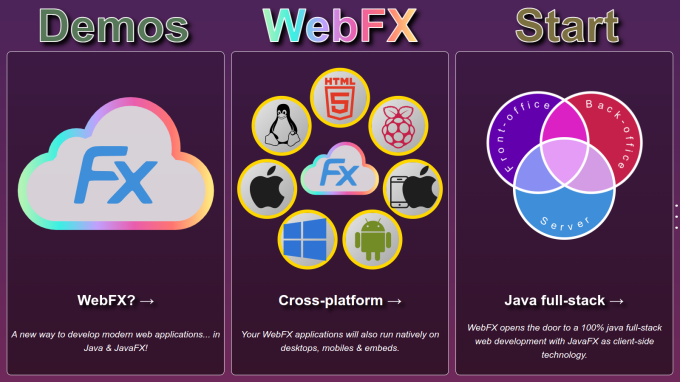
      <![CDATA[<p><a href="https://webfx.dev/"><img src="/2022/07/22/website-launch/webfx-website.png" alt="WebFX website"></a></p><p>We are very happy to announce that the WebFX <a href="https://webfx.dev/">website</a> is now live. The whole project has been paused for nearly a year due to some circumstances, but the very good news is that the conditions have finally been gathered to restart it. So the WebFX project has resumed this year, and we managed to accomplish the next stage: publishing the website. </p><p>The website comes along with this blog and the <a href="https://docs.webfx.dev/">documentation</a> which is minimal for now but will grow over the time. Today, it’s mainly a guide to get you started, which is probably the thing you were awaiting the most, if you are following the project.</p><p>We hope you will enjoy your first experience with WebFX. The project is still in the incubation phase, and we are aware you will encounter some obstacles (limited JavaFX coverage, bugs in WebFX, GWT compilation errors in your code if you are not used to it, …), but we hope you will appreciate its great potential for Java-based environments.</p><p>Despite the limitations, you can already develop real applications. The website for example has been developed using WebFX. It presents the technology through a series of animated cards. If you are interested in its JavaFX code, you can check out its <a href="https://github.com/webfx-project/webfx-website">GitHub repository</a>.</p><!---The initial website had a couple of additional cards, but some found them be a bit controversial, so we considered their feedback, and finally removed them. These cards are still online [here](https://preview.webfx.dev) however for the curious.[![Additional cards](/2022/07/22/website-launch/webfx-preview.png)](https://preview.webfx.dev)--><p>Thank you all for starring the project, this was a very helpful feedback. It contributed to the decision made by the organization in which we are working to rebase its own main business system onto WebFX! It’s a quite big Java-based application, and we are in the process of open sourcing it as well. So it will be the first real world WebFX enterprise application, and it will be available on GitHub. We will give you more information on this soon in this blog. So don’t hesitate to subscribe the <a href="atom.xml">feed</a> to keep updated!</p>]]>
    </content>
    <id>https://blog.webfx.dev/2022/07/22/website-launch/</id>
    <link href="https://blog.webfx.dev/2022/07/22/website-launch/"/>
    <published>2022-07-22T12:52:12.000Z</published>
    <summary>
      <![CDATA[<p><a href="https://webfx.dev/"><img src="/2022/07/22/website-launch/webfx-website.png" alt="WebFX website"></a></p>
<p>We are very happy to]]>
    </summary>
    <title>The WebFX website is live!</title>
    <updated>2026-03-09T16:03:00.371Z</updated>
  </entry>
</feed>